 mooola
We built mooola around a simple idea: you should be able to understand your money without handing over your banking life. Import a statement, organise your spending and see the patterns, with the work happening on your device.
We’re now building optional mooola accounts so we can offer more useful features, including shared payments and access to your data across signed-in devices. Those features need an online service. That changes what we hold when you choose to use them, and we want to explain that change plainly.
Why we’re creating mooola accounts
Some things work beautifully on one device. Others need a way to connect people or recognise that two devices belong to the same person. A shared grocery bill needs to reach the people splitting it. Changes made on one device need somewhere to go if you want to pick them up on another.
A mooola account provides that identity. It lets us connect you to the features you choose, keep shared records consistent and give you access to your own remote data. It is separate from a bank account and does not require your banking login.
That is why we’re adding accounts: to make room for more and better features. Importing statements, reviewing expenses and understanding your spending will remain available without signing in.
How our privacy promise changes
For local expense tracking, the principle stays the same: your statements are processed on your device, and your financial records do not need to be sent to mooola.
When you deliberately enable a feature that stores information online, we will hold the data needed to provide that feature. We cannot honestly describe an uploaded transaction as “only on your device”. It becomes data held by mooola to deliver the service you chose.
We will not sell or rent your account, synced financial or shared-payment data. We will not use it for marketing, advertising targeting or building advertising profiles. Its purpose is to run, secure and support the features you ask us to provide.
The choices matter as much as the promise. An account, payment sharing, remote access and uploads are separate decisions. You can keep using the local app, use Share without syncing your full financial history, or choose remote access when it is useful to you.
Optional app activity and import diagnostics remain separate choices. The website’s optional advertising and analytics settings are also separate; signing in to mooola is not permission to use your account or financial records for marketing.
What each choice means
| Your choice | What mooola stores online |
|---|---|
| Use the app without an account | No account or remote copy of your financial records is created. Existing optional diagnostics and limited network requests are separate. |
| Create a mooola account | Your sign-in identity, profile, session records and feature preferences. Creating a new account does not upload transactions or statements. |
| Enable Share | Your sharing preference, connections, groups and the payments, splits and repayments involved in sharing. |
| Enable remote access | Your preference and sync status. The app can download data already stored for your account. Uploading this device’s financial records is a separate choice. |
| Enable uploads | Existing and future financial records within the sync scope, plus the import and matching information needed to keep them consistent. |
Share and remote access start off for new accounts. Existing accounts keep their saved preferences, and uploads that were previously enabled stay enabled. Signing back in is not a reset of those choices.
What an account stores
Sign-in uses Google. We store your account identity, name, email address, email-verification status and profile image, together with the identifiers and sign-in records needed to recognise and authenticate you. Google handles your password; mooola does not receive it.
We also store your mooola profile and feature preferences. Session records include expiry and activity timestamps and can include an IP address and device or browser information. These are identifiable account records, not anonymous app activity.
Your profile helps other people recognise you in shared features. People can find you by email to send a friend request. Creating an account therefore changes what mooola knows about you, even if you leave financial uploads off.
What remote access and uploads store
Remote access lets a signed-in device receive data already held for your account. Uploads are a separate control in Profile. Turning on remote access does not, on its own, turn on uploads that were off.
If you enable uploads, the scope includes your existing records as well as future changes. It is not limited to transactions imported after that moment. The synced information includes:
- Transactions and balances: descriptions, original descriptions, dates, money in and out, fees, balances, currencies, categories, merchant references and changes to how a payment is labelled or treated.
- Bank accounts and merchants: account names, bank identifiers, account types, currencies, account-number last four digits, merchant names and the matching information used to keep records associated correctly.
- Budgets and recurring payments: budget settings and assignments, merchant and category rules, and your changes to recurring-payment labels, dates, frequency or inclusion.
- Import history and document metadata: filenames, document fingerprints, file sizes, import dates and results, covered periods, and matching records used to recognise repeated or overlapping imports.
- Wallet payment records: recognised transaction details and capture-matching information, including card last four digits where present. The original notification text stays on the device.
- Selected preferences and sync status: your preferred currency and setup goal, plus device sync identifiers, sync times and counts of pending or conflicting changes.
We store these records so your signed-in devices can work with a consistent picture of your finances. Friends do not gain access to this private history because you enable remote access; they see the details involved in payments you share with them.
The statement file stays local; its extracted records can sync
Original statement files, raw Google Wallet notifications, banking login credentials and device permissions are outside this upload scope. That distinction does not make the uploaded records non-sensitive. A transaction description, balance or filename can reveal personal information even when the original PDF never leaves your device.
Remote storage is an intentional change from keeping everything locally. mooola’s service receives and processes those records to provide the feature. It should not be understood as a promise that mooola is technically unable to access uploaded data.
What Share stores, and who can see it
Share will let you split payments with friends and family, organise them into groups and keep track of who owes what. You can choose an expense you have already imported or create a shared payment manually.
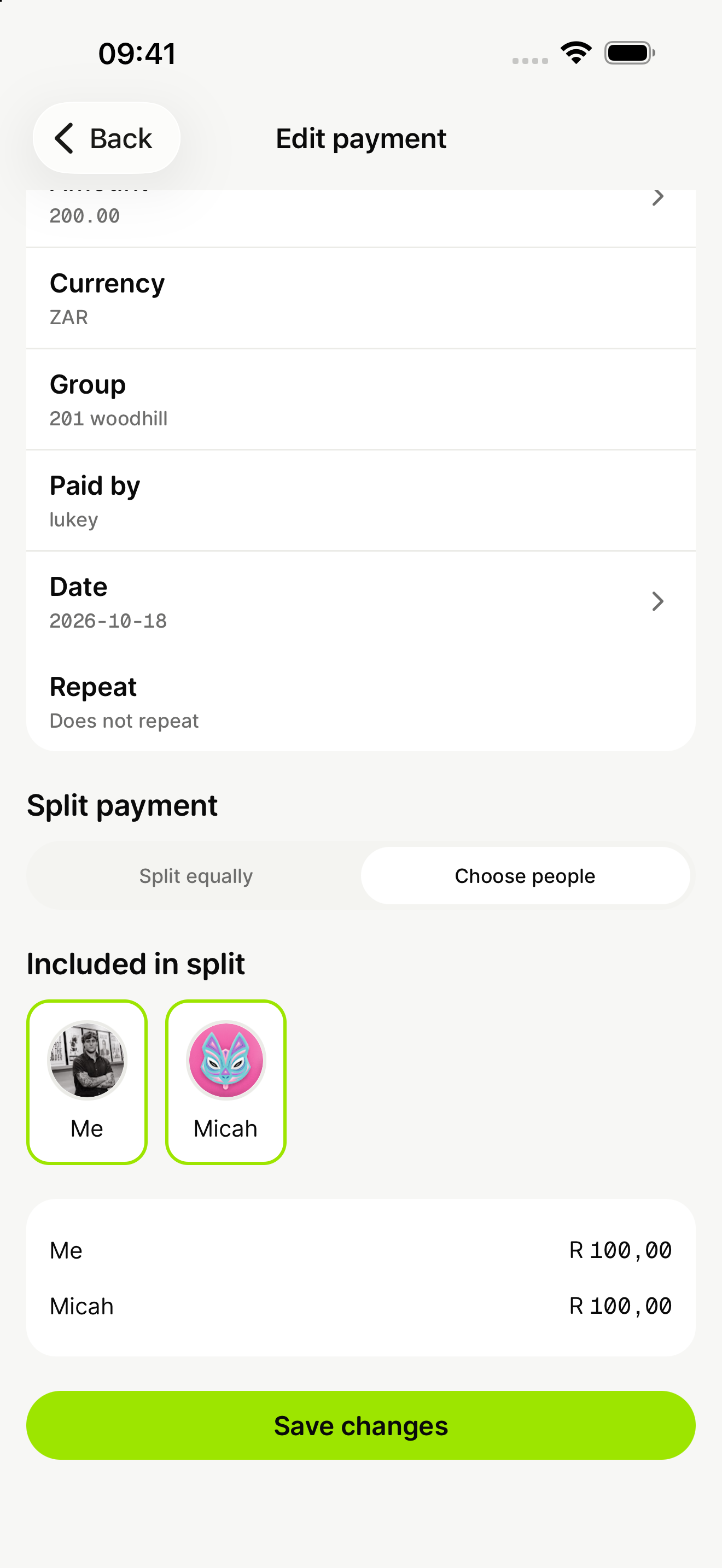
A preview of splitting a payment in Share. You choose the people included and can see each person’s portion of the total.
The shared payment is visible to its participants. Your other transactions and private account balances are not shared with them.
See how Share worksShare needs its own online records. These include your profile and sharing preference, friend requests and connections, group details and membership, and any profile or group pictures you upload.
For shared payments, we store descriptions, amounts, currencies, dates, who paid, who is included and each person’s share. We also store edits, recurring shared payments, repayments and the records used to calculate outstanding balances. A payment created from an imported expense can include a reference to that selected transaction so it is not shared twice.
Participants can see the shared details and who owes whom. Choose descriptions and pictures with that audience in mind. Once information has been shown to another participant, turning a setting off cannot make them forget it or remove a copy they have kept.
Using Share does not upload your full transaction history or your statement files. Sharing one restaurant bill does not give the group access to your salary, other purchases or bank-account balances. Uploading personal financial records for remote access is a separate choice.
Online features need service providers
Google provides sign-in. The online service uses Cloudflare infrastructure to run the backend and store account, financial and sharing records, including uploaded profile and group images. These providers are part of delivering the service; “we do not sell your data” does not mean no service provider processes it.
If you separately authorise a connected tool, its access depends on the permissions you grant. That is another data-sharing decision: information received by a tool is also subject to how that provider handles it. A mooola account does not automatically authorise those connections.
Our commitment is about purpose: account and feature data are for delivering the functions you choose, with the security and support those functions need. They are not a marketing audience or a product we sell to someone else.
Turning a feature off is different from deleting its data
These controls have different effects, and we do not want the word “off” to imply more than it does:
- Turning uploads off stops sending further personal-data changes from that device. It does not erase records already uploaded.
- Turning remote access off pauses remote sync. Server copies remain, including earlier versions of records that were edited or deleted.
- Turning Share off pauses your access to sharing. Existing shared payments, repayments and balances remain stored and available to the other participants.
- Signing out ends your signed-in use on that device. It is not an instruction to delete your account or its server data.
Deleting a record from the current view is also different from erasing every historical copy. The sync service keeps change history, so an edited or deleted record can remain in earlier versions. We are not promising automatic erasure or a particular deletion deadline through any of the switches above.
For questions about information held about you or a deletion request, contact contact@mooola.co.za. Shared records involve other people too, so a request needs to distinguish your private synced records from payments and balances that participants still rely on.
You decide how much of mooola you want to connect
If the local app already does what you need, keep using it that way. You will not need a mooola account to import a statement, review your spending or organise your expenses.
If a connected feature helps, the choice should come with a clear explanation of what it stores. The account, Share and remote-data screens include a “What data is stored?” disclosure so you can review the relevant information when making that decision.
Accounts let us build features that need more than one device or one person. Our responsibility is to be clear about the information those features require, use it only to provide them, and leave you in control of whether to use them.
This announcement previews the upcoming account and remote features. For how the current local app and website handle information, read our Privacy Policy.